Data Preparation
Summary
sofastatsneeds long-format data

Overview
Your data might come from a database, or you might have entered it manually into a spreadsheet.
But however you get your data, sofastats needs your data to be in a structure called "long format"
(sometimes called "long-data format").
This is explained in more detail below, but it has nothing to do with colour or style -
it is to do with the way the data is structured.
Hopefully, your data is already in the long format structure and everything Just Works. If not, it should be possible to transform your data into the correct structure. Here are some suggestions for how to make any required changes.
Long Format vs Wide Format
The internet has numerous user-friendly and in-depth explanations of long-format versus wide-format. If the explanation below doesn't help, have a look for something that works better for you.
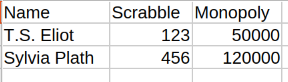
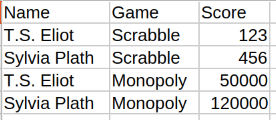
Wide format splits values for variables into different columns. Long format splits variables into values in the same column. Confused?
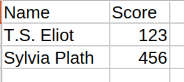
Let's start with a simple dataset and, as we change it, we can see the difference between wide-format and long-format.
| Wide Format (easiest for humans to read) | Long Format (easiest for computers to read) |
|---|---|
| Score only | Score only |
 |
|
| Per Game (need new columns for each new Game) | By Game (need new blocks of rows in Game column for each new Game) |
 |
 |
| Per Game and Year (each column must be the combination so columns need to change) | By Game and By Year (for each new variable a new column must be added) |
 |
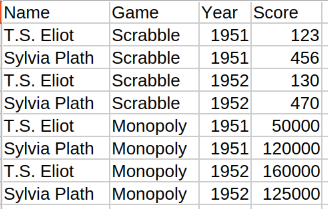 |
| As new variables are added there can be a combinatorial explosion 💥 of columns needed | As new variables are added the table gets longer much faster than it gets wider |
The example CSVs in the sofastats_examples package are all long-format.
Converting to Long Format
If you need to change the data structure, you have at least three options.
- Manually shift round blocks of data. This is possible with small amounts of data.
- Write your own Python script using a library like Pandas or Polars.
- Ask an AI for help about your specific data - it should be able to provide some customised Python code you can run to transform your specific data.
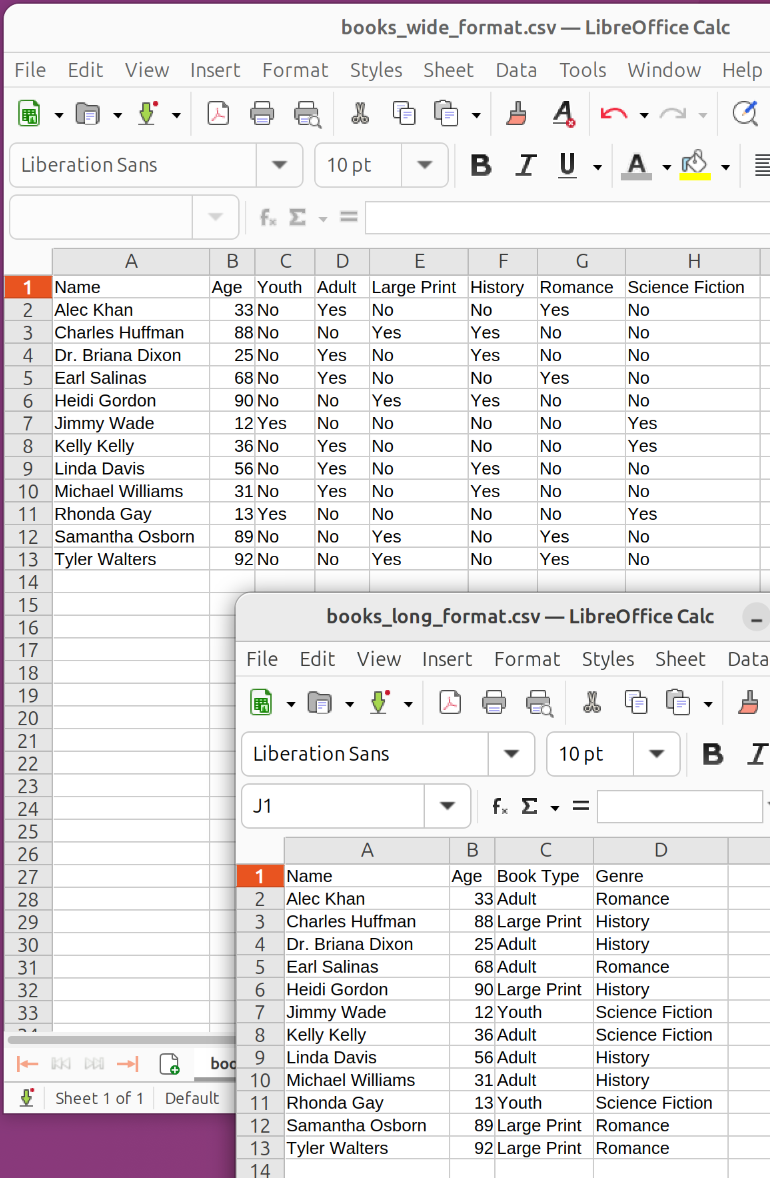
Here is an example of some working code to transform some synthetic library data.
import pandas as pd

def remove_long_format_rows_with_no(df: pd.DataFrame) -> pd.DataFrame:
    """
    We need this because 'No' is not an actual value - this makes sense when you follow the code step-by-step
    """
    new_df = df[~(df == 'No').any(axis=1)].drop(columns='value')
    return new_df

def to_long_format(con, *, debug=False):
    df_source = pd.read_csv('/path/to/wide_format.csv').sort_values('Name')
    #
    # Turn wide format:
    #
    #      Name    Youth    Adult    Large Print (ignoring columns other than the ones we are "lengthening")
    #    Rachel       No      Yes             No
    #       ...      ...      ...            ...
    #
    # into naive long format:
    #
    #      Name      Book Type    value
    #    Rachel          Youth       No   <------ Just another legitimate value as far as melt is concerned
    #    Rachel          Adult      Yes
    #    Rachel    Large Print       No
    #       ...            ...      ...
    #
    # and then, finally, into Yes/No-aware long format:
    #
    #      Name      Book Type
    #    Rachel          Adult
    #       ...            ...
    #
    df_book_type_inc_no_rows = pd.melt(df_source, id_vars=['Name'],
        var_name='Book Type', value_vars=['Youth', 'Adult', 'Large Print'])
    df_book_type = remove_long_format_rows_with_no(df_book_type_inc_no_rows)
    #
    # As above but:
    #
    #      Name    History    Romance    Sci-Fi
    #    Rachel         No        Yes        No
    #       ...        ...        ...       ...
    #
    # into:
    #
    #      Name      Genre
    #    Rachel    Romance
    #       ...        ...
    #
    df_genre_inc_no_rows = pd.melt(df_source, id_vars=['Name'],
        var_name='Genre', value_vars=['History', 'Romance', 'Science Fiction'])
    df_genre = remove_long_format_rows_with_no(df_genre_inc_no_rows)
    #
    #       Name   Age        +       Book Type
    #     Rachel    21                    Adult
    #        ...   ...                      ...
    #
    # becomes:
    #
    #       Name   Age    Book Type
    #     Rachel    21        Adult
    #        ...   ...          ...
    #
    #   +   Genre
    #     Romance
    #        ...
    # becomes:
    #
    #       Name   Age    Book Type      Genre
    #     Rachel    21        Adult    Romance
    #        ...   ...          ...        ...
    #
    df_added_book_type = df_source[['Name', 'Age']].merge(df_book_type, on='Name', how='inner')
    df_added_genre = df_added_book_type.merge(df_genre, on='Name', how='inner')